Current Support Thread at Zen Cart Forums: http://www.zen-cart.com/showthread.php?200923-Product-Notifications-on-product_info-Pages-Support-Thread
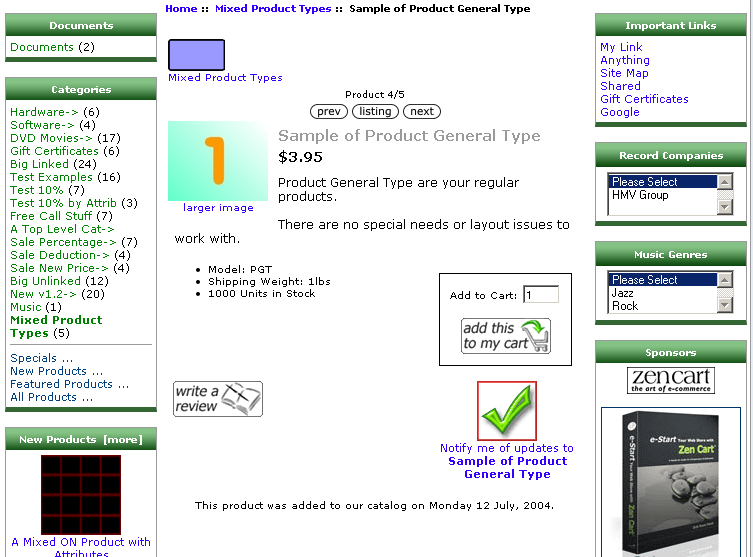
This plugin adds the ability to sign up for product notifications on the product_info pages. If your store doesn't use sideboxes, an out-of-the-box Zen Cart® installation provides no way for a customer to receive product notifications without previously purchasing the product! The updated product_info display looks like the screenshot to the left.
Just like the sidebox form of the product notification, a customer needs to be signed in to modify their product-notification settings. The presence of the notification box is controlled by your admin's Configuration->Customer Details->Customer Product Notification Status; the value must be set to 1 for the box to appear. If you want the notification box to show only on the product_info page and not in the sidebox, you'll need to use your admin's Tools->Layout Boxes Controller and turn sideboxes/product_notifications.php OFF.
Optionally, if you want the product-notification text to be "generic", i.e. not include the current product's name, you can edit your template-override version of english.php (/includes/languages/YOUR_TEMPLATE/english.php), changing this section:
// notifications box text in sideboxes/products_notifications.php
  define('BOX_HEADING_NOTIFICATIONS', 'Notifications');
  define('BOX_NOTIFICATIONS_NOTIFY', 'Notify me of updates to %s');
  define('BOX_NOTIFICATIONS_NOTIFY_REMOVE', 'Do not notify me of updates to %s');
to
// notifications box text in sideboxes/products_notifications.php
  define('BOX_HEADING_NOTIFICATIONS', 'Notifications');
  define('BOX_NOTIFICATIONS_NOTIFY', 'Notify me of updates to this product.');
  define('BOX_NOTIFICATIONS_NOTIFY_REMOVE', 'Do not notify me of updates to this product.');
If your store uses sideboxes and you only want the notifications box to appear only in the sideboxes … don't install this plugin!
There are no core-file overwrites in this plugin, but you should always backup your cart’s database and files prior to making any changes.
Replace the files you copied with their previous versions.