Copyright (c) 2013-2015, Vinos de Frutas Tropicales
Current Support Thread at Zen Cart Forums: http://www.zen-cart.com/showthread.php?215052-Styleable-Min-Max-Unit-Mixed-Display
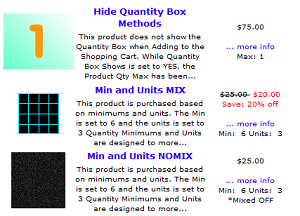
This plugin makes a slight modification to the core Zen Cart function zen_get_products_quantity_min_units_display, wrapping each of the separate elements with an HTML <span> to allow a product's display to be more customizable.
The image to the left illustrates some of the Zen Cart "demo products" that highlight the min/max/unit/mixed features. When you view the HTML source generated for the Min and Units NOMIX product, for example, there's nothing to grab as a CSS selector to properly style the output:
Min: 6 Units: 3<br />*Mixed OFF
Once this plugin is installed, the generated HTML includes class-based spans that allow you to separately style each element:
<span class="qmin">Min: 6</span><span class="qunit"> Units: 3</span><span class="qmix"><br />*Mixed OFF</span>
Now you're styling! The Max: value uses a class of qmax.
There is one core-file overwrite in this plugin; you should always backup your cart's database and files prior to making any changes.
Replace the plugin's core-file overwrite with the backup version of the file.